Tab "Cover Page"
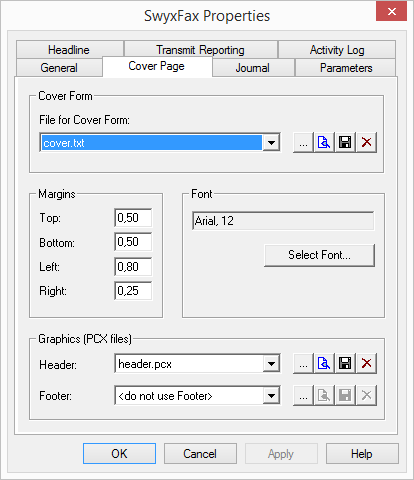
With the help of this dialog, you can set the page format, font and font size, and the headers and footers for the cover page.
Cover Page Template
The provided 'cover.txt' file is a template for the cover page and will be saved in the database.
By selecting  , the file is saved and then displayed, provided a suitable program has been specified in the Windows configuration. You can also just store the cover page in the file system
  , or delete the file in the database
  .
.
, the file is saved and then displayed, provided a suitable program has been specified in the Windows configuration. You can also just store the cover page in the file system , or delete the file in the database .To save a new cover page in the database, you can search here for an existing TXT file  . The TXT file will be saved into the database (category "Fax Cover Pages") and can be used as cover page by all users. See The “Files” Tab.
. The TXT file will be saved into the database (category "Fax Cover Pages") and can be used as cover page by all users. See The “Files” Tab.When creating the cover page, you can enter information concerning the sender, the recipient, as well as other information such as the page number or the date as variables. This information is then replaced by the appropriate data. You can use the following variables:
<From.Company> | Sender's company |
<From.Name> | Sender's name |
<From.Postal> | Sender's address |
<From.Dept> | Sender's department |
<From.Email> | Sender's email address |
<From.Voice> | Sender's phone number |
<From.Fax> | Sender's fax number |
<To.Company> | Recipient's company |
<To.Name> | Recipient’s name |
<To.Postal> | Recipient's address |
<To.Dept> | Recipient's department |
<To.Email> | Recipient's email address |
<To.Voice> | Recipient's phone number |
<To.Fax> | Recipient's fax number |
<Date> | Date |
<Pages> | Number of pages |
<Message> | Short message |
Margins
Here you can define the width of the margins in centimeters for the cover page. This setting is applied for the display of the title page.
Font
"Select Font…" is used to define the font, the size and the typeface. This setting is applied for the display of the title page.
Graphic (PCX files)
You can insert graphics such as the company logo in the header or the footer of the cover page. In order to do this, you must have a PCX file in black-white display (monochromatic) with a maximum pixel size of 1768 x 2200 pixels (breadth x height). In our experience, the best size is 800 x 200 pixels.
By selecting , the file is saved and then displayed, provided a suitable program has been specified in the Windows configuration. You can store the graphic in the file system , or delete the file in the database .
, the file is saved and then displayed, provided a suitable program has been specified in the Windows configuration. You can store the graphic in the file system , or delete the file in the database . To save a new graphic in the database, you can search here for an existing PCX file  . The PCX file will then be saved into the database (category "Fax Cover Graphics") and can be used as footer or header for the cover page. See The “Files” Tab.
. The PCX file will then be saved into the database (category "Fax Cover Graphics") and can be used as footer or header for the cover page. See The “Files” Tab.Last modified date: 03.12.2019