Configuration
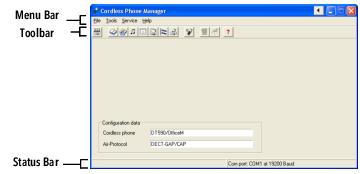
In the Start menu under "Programs", select the option "Cordless Phone Manager". The program is started.
Access to the functions of the Cordless Phone Manager is restricted for the user. Only the administrator can use all the functions. The availability of the functions in the menu bar and toolbar also varies, depending on the selected handset type.
 |
For a handset to be configurable with the help of the Cordless Phone Manager, the handset must be connected to the computer by a suitable interface cable.
|
 | File | Settings | Settings (Settings) |
 | Tools | Company phone book | Global Phonebook (Company phone book) |
 | Tools | User phone book | Private Phonebook (User phone book) |
 | Tools | Ringing melodies | Melodies (Ringing melodies) |
 | Tools | Start-up screen | Start-up screen (Start-up screen) |
 | Tools | PBX Settings | PBX Settings (PBX Settings) |
 | Tools | Additional language | Additional language (Additional Language) |
 | Tools | Configure SwyxPhone D300 | Configuration of SwyxPhone D300, see Configure SwyxPhone D300 |
 | Tools | Software Download | Software Download (Software download) |
 | Help | Help |
Last modified date: 03.12.2019